


Bu ürünün kampanyalı satışı stoklarla sınırlıdır. Bir tüketici bu kampanya stoğundan maksimum 10 adet satın alabilir.
Çiçeksepeti kampanya koşullarında değişiklik yapma hakkını saklı tutar.
Ürünün iade politikasını öğrenmek için tıklayın.
Bu ürün ELEKTROMARKA tarafından gönderilecektir.
Bu satıcının ürünlerinde geçerli 350,00 TL Üzeri Kargo Bedava
Bu Satıcının Tüm Ürünlerini Görüntüle
Ürün sayfasında gördüğünüz fiyat bilgileri, satıcı tarafından belirlenmektedir.


S110-24LP2SR
Overview
Table 4-28 Basic information about the S110-24LP2SR
| Item | Details |
|---|---|
| Description | S110-24LP2SR (24*10/100/1000BASE-T ports, 2*GE SFP ports, PoE+, AC power) |
| Part Number | 98012198 |
| Model | S110-24LP2SR |
Components
Figure 4-8 S110-24LP2SR appearance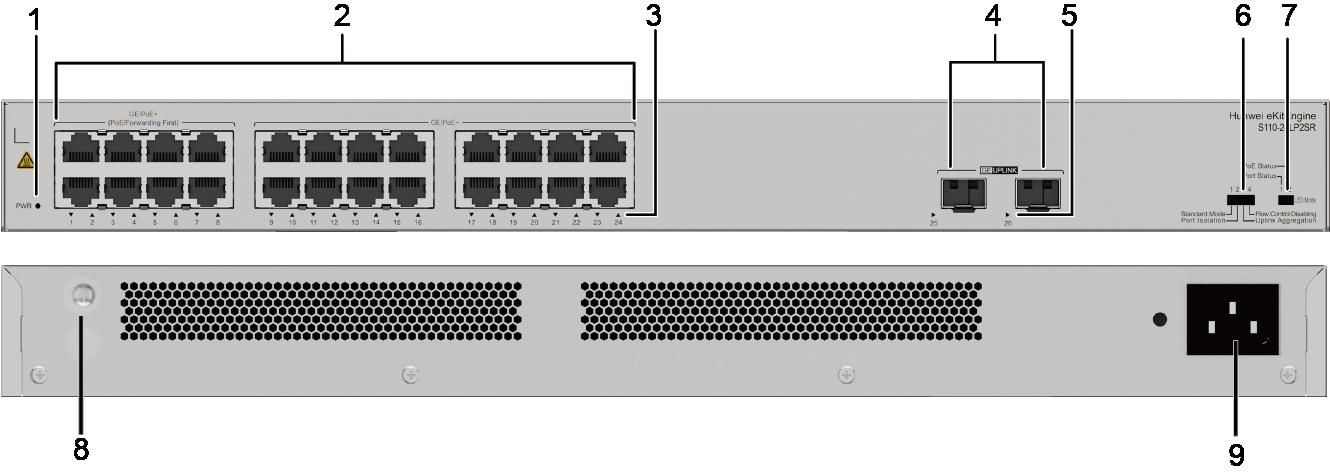
1 | PWR indicator | 2 | Twenty-four GE PoE+ electrical ports NOTE:Only the new model with the Forwarding First and PoE First silkscreens on the front panel supports the following functions: Forwarding First: This function is available on ports 1 to 8. With this function, traffic on ports 1 to 8 is preferentially forwarded when traffic congestion occurs on uplink ports. PoE First: This function is available on ports 1 to 8. With this function, terminals connected to other ports will not preempt the power of ports 1 to 8 when the device cannot supply full PoE power to connected terminals; additionally, the power of these ports will be preferentially restored after the device restarts. |
3 | Electrical port indicator | 4 | Two GE optical ports |
5 | Optical port indicator | 6 | Port mode switch button NOTE:Standard Mode: All ports are in the same VLAN, and the flow control function is enabled. Port Isolation: All downlink ports are isolated from each other and cannot communicate with each other. Downlink ports can communicate only with uplink ports. (The last two downlink electrical ports are not isolated.) Uplink ports are not isolated or aggregated. Uplink Aggregation: Two uplink optical ports are aggregated into a trunk interface. Eth-Trunk supports load balancing only based on source physical ports. Flow Control Disabling: All ports are in the same VLAN and flow control is disabled. |
7 | Port indicator status switch button NOTE:Port status: The port indicator indicates the data transmission status of the port. PoE status: The port indicator indicates the PoE status of the port. | 8 | Ground screw |
9 | AC socket NOTE:Use the power cable delivered with the device. | - | - |


